Public-key encryption is the backbone of modern web security. At the center of this system sits the Secure Sockets Layer (SSL). Netscape created this protocol to help browsers and web servers talk safely. It was never meant to stand alone forever.
Today, SSL is just a legacy term. The actual standard in use is Transport Layer Security (TLS).
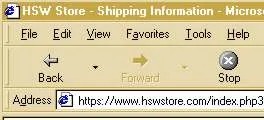
You don’t need to be a coder to spot the difference in your daily browsing. It’s right there in the address bar. Look for the “s” in https.
Before, you saw http. Now, you see https.
There is usually a small padlock icon nearby. Sometimes it’s in the status bar at the bottom of the window. Sometimes it floats in the URL field. The meaning is the same. Your data is encrypted. If you are logging into a bank account or using PayPal, you want to see that lock. Your payment details should not be sitting in plain text on the wire.
“TLS and SSL rely heavily on certificate authorities to verify identity.”
But how does the browser actually know the site is safe? It isn’t magic. It is a handshake with a Certificate Authority (CA).
When you request a secure page, the process kicks off. The browser adds the “s” to “http”. Then it checks three specific things before loading the page:
- Trust : Does the certificate come from a party the browser trusts?
- Validity : Is the certificate currently active and not expired?
- Match : Does the certificate actually belong to the site you are visiting?
If any of these checks fail, the browser will throw a warning. It won’t let you proceed blindly. This system is why you can trust that your sensitive information passes along securely. The protocol has evolved, but the core job remains the same. Keeping your data out of the hands of eavesdroppers.
The handshake that keeps your data safe
This is where the actual security happens.
The browser takes that public key you just received and uses it to encrypt a randomly generated symmetric key. Simple enough.
But here is the catch. Public-key encryption is heavy. It demands serious computing power. Doing it for every single packet of data would grind your browser to a halt. So, systems don’t do that.
Instead, they use a hybrid approach.
Think of it as a secure tunnel. The public key is just the doorbell. It lets the initial message through. Once inside, you switch to symmetric key encryption for the rest of the conversation. It is faster. It is lighter. It is the standard for how two computers initiate a secure session.
One computer creates the symmetric key. It wraps it up using public-key encryption. It sends it to the other side. The other side unlocks it. Now both sides have the same secret code.
They communicate using symmetric-key encryption from that point on.
And here is the part most users miss. The key doesn’t last.
When the session ends, the key is destroyed. It is discarded. Gone.
If you start a new session, a new symmetric key is created. The whole process repeats.
“Once the session is finished, each computer discards the symmetric key used for that session.”
This is called forward secrecy. Or at least, a basic version of it. It means even if a hacker steals one key, it is useless for anything else. Each session is isolated. Each session has its own unique lock.
Why does this matter?
Because it limits the damage. If your HTTPS connection is intercepted, the attacker only gets that one session’s data. They don’t get your password history. They don’t get your old emails. They don’t get the key to the kingdom.
The key is temporary. The session is ephemeral. The security is continuous.
It is a dance of creation and destruction. Keys are born. Data flows. Keys die.
And you never even see it.