
Yawcam is not trying to be the next Adobe Premiere. It’s something much more specific. The name “Yet Another WebCAM software” sounds dismissive, but that’s the point. It’s a free tool built for one job: grabbing video from a USB camera and blasting it onto the web in real time.
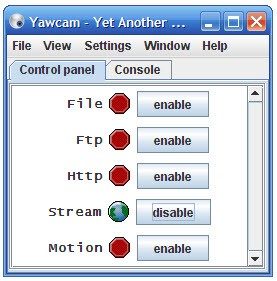
Developed by an independent coder, it fills a gap between clunky enterprise security suites and basic webcam apps. You can use it to watch your front door or stream a live feed to a website. The interface is straightforward. It works on Windows. That’s it.
The core utility lies in its simplicity. Unlike paid competitors that drown you in licensing fees and complex dashboards, Yawcam focuses on the basics. It streams MJPEG video. It sends HTTP streams. It captures still images. You get what you need without the bloat.
Yawcam transforms any compatible webcam into a functional surveillance node with zero cost.
This approach appeals to everyone from students tinkering with code to small business owners who need basic monitoring. It doesn’t require specialized hardware. Just a camera and a PC. The software handles the heavy lifting of packaging the video for network transmission.
Why Choose Yawcam for Home or Business Monitoring?
The appeal isn’t just the price tag. It’s the flexibility. You can schedule recordings. You can set it to send email alerts when it detects motion. This last feature is huge for remote security. You don’t need to watch the stream 24/7. Yawcam watches for you.
Access is remote by default. As long as you have an internet connection, you can check the feed from anywhere. No need to be in the building. This makes it a viable option for homeowners who want peace of mind without installing a full-blown security system.
It also supports IP whitelisting and password protection. These are basic security features, but they matter. You don’t want your live feed broadcasting to the entire internet for anyone to see. The software lets you lock it down to specific trusted IP addresses.
Compared to tools like iSpy or ZoneMinder, which can be resource-hungry and complex to configure, Yawcam is lightweight. It runs on older machines. It doesn’t demand a powerful processor to encode high-definition 4K video. It streams in formats that most web browsers can handle natively.
Installation and Compatibility: The Windows Constraint
Getting Yawcam running is easy. If you are on Windows, you are good to go. The software supports everything from Windows XP all the way up to Windows 11. The installer is a simple wizard. You download the executable, click through the prompts, and you’re set.
But there’s a catch. The software depends on Java. The developer makes this clear, but you still need to ensure Java is installed on your machine. If your system lacks a compatible Java Runtime Environment (JRE), the streaming components will fail.
This dependency is a relic of its age. It’s not unique to Yawcam, but it’s a friction point for modern users who expect plug-and-play functionality.
Where Does Yawcam Fit in the Ecosystem?
Yawcam is strictly a Windows application. There is no native version for macOS, Linux, Android, or iOS. If you are on a Mac, you’re out of luck unless you run Windows via Boot Camp or a virtual machine.
For Linux users, ZoneMinder is the go-to alternative. For mobile devices, you’d typically use the app associated with your IP camera brand rather than a standalone PC tool.
This limitation narrows its audience. It’s perfect for an office with a few PCs or a home setup anchored to a desktop or laptop. It’s less useful in a purely Apple or mobile-first environment.
The software’s broad compatibility with older Windows versions is actually a feature, not a bug. Many small businesses and institutions run legacy systems. Yawcam works on them. This extends the life of older hardware that might otherwise be discarded.
Managing Versions and Updates
If your webcam isn’t working with the latest version, don’t panic. The developer archives older releases. You can dig up a previous edition if your specific hardware driver conflicts with the current build. This backward compatibility is rare in modern software and keeps Yawcam relevant for niche setups.
To force an update, the cleanest method is a full uninstall. Remove the current version. Reinstall the latest build from a trusted source like Futura. This ensures you get the latest security patches and bug fixes.
Keeping the software updated is important. Security vulnerabilities can creep into streaming protocols. Regular updates mitigate these risks.
Is Yawcam Still Relevant in 2024?
It’s a question of needs. If you need advanced analytics, AI detection, or cloud storage integration, Yawcam won’t help you. Those features cost money. They require complex backend infrastructure.
Yawcam offers raw access. It gives you the stream. It’s up to you to decide what to do with it. You can embed it in a webpage. You can record it to a local drive. You can just watch it.
For users who want a simple, free, and effective way to monitor a space without monthly subscriptions, it remains a solid choice. The lack of cross-platform support is a significant drawback, but the ease of setup and low system requirements balance it out for many.
It’s not flashy. It doesn’t win design awards. But it works. And in the world of surveillance software, functionality often beats aesthetics.
Getting Yawcam doesn’t cost a dime. There is no premium tier. No student discount. No corporate license fee. The developer’s original philosophy was simple: keep it open and free. This means every feature works from the moment you install it. You aren’t paying for “basic” video streaming while holding back on motion detection. You get it all.
The catch? It’s proprietary software. The code isn’t open source. But that doesn’t mean you’re locked out. You can install it on as many machines as you want without hitting a paywall or entering a product key. The activation process is nonexistent. It just works.
Where to Download Yawcam Safely
Because the software is free, the internet is full of sketchy mirrors. That’s dangerous.
You need integrity. You need to know the file isn’t bundled with malware or spyware. Stick to reputable platforms. Futura is one of the few trusted sources that guarantees the file’s validity. Do not download from random forums or link shorteners. The risk isn’t worth the few seconds saved.
“Ensure you verify the source of the program to avoid any altered version containing malicious software.”
There are no official certifications either. If you’re looking for a certificate to hang on your wall, you won’t find one. Instead, rely on community forums and video guides. They are the de facto training manual for this tool.
Advanced Motion Detection and Alerts
This isn’t just a static picture viewer. Yawcam does real-time work.
The core feature is motion detection. It watches the camera’s field of view. When something moves, it triggers an action. You can capture a still image. Or you can send an immediate email alert. This is critical for remote monitoring. You don’t need to stare at the screen all day. The software watches for you.
It also handles local recording. Your hard drive becomes the archive. No cloud subscription required. No monthly storage fees eating into your budget. If you need to move data off-site, there are options. The software supports FTP uploads. You can push images to a remote server automatically. Or you can publish them at set intervals to a website.
Streaming Protocols and Access Control
Streaming is where this software shines in flexibility. It doesn’t force you into one ecosystem. You can stream via HTTP. You can use MJPEG. You can even push feeds through FTP. This variety matters for different use cases.
Want to monitor a classroom? Use HTTP. Checking on a home security camera from your phone? MJPEG might be lighter on bandwidth. The choice is yours.
Security is built-in, not an afterthought.
- IP Filtering: Block unwanted addresses.
- Password Protection: Lock the interface.
- Whitelists: Define exactly who can see the stream.
This is vital for businesses needing to comply with internal policies. It’s also essential for homeowners who don’t want strangers peeking into their living rooms. The developers prioritized simplicity here. You don’t need a degree in network engineering to set these rules.
Why It Still Matters in 2024
Most people assume free surveillance software is obsolete. They’re wrong.
Yawcam bridges the gap between simple webcam apps and expensive commercial security suites. It offers granular control over resource usage. You can schedule capture times. Activate cameras only during specific hours. This saves bandwidth and hard drive space.
There is no central authority pushing updates or dictating terms. The community fills that void. Forums share tricks. Guides explain advanced configurations. It’s a living ecosystem.
The perspective is broad. From a kid watching their goldfish to a small business tracking inventory, the utility scales with the user’s needs. The software adapts because the people using it demand it.
Is it perfect? No. Nothing is. But it’s transparent. It’s accessible. And it respects your wallet while respecting your need for security. The open-ended nature of its development means it will likely keep evolving, driven by users who want control without the corporate price tag.
What Yawcam Actually Is and Who It’s For
You don’t need expensive hardware to set up a functional surveillance system. That’s the core appeal of Yawcam, or “Yet Another Webcam Software.” It’s a lightweight, free tool designed for Windows users who want to repurpose old hardware or simply stream video without buying a subscription. The developer, Magnus Lundvall, built this as standalone freeware. It doesn’t bloat your system. It relies on standard Windows components. If your operating system can see the camera, Yawcam can likely use it.
This isn’t for the high-end professional broadcaster. It’s for the person who wants a quick, local stream or a simple FTP upload. Think of it as a bridge between your USB webcam and the internet. The catch? You need Java. Specifically, the Java Runtime Environment (JRE). Without it, the software won’t run. It’s a dependency that can frustrate users who prefer zero-install solutions, but for those who already have Java installed (or don’t mind the setup), it works.
Core Technical Requirements and Compatibility
The system requirements for Yawcam specifications are surprisingly low. You can run this on machines that Microsoft has long since abandoned. It supports Windows XP through Windows 11, including both 32-bit and 64-bit architectures. That breadth is its biggest selling point. You can pull a dusty laptop from a closet, install Yawcam, and have it streaming in minutes.
Hardware-wise, it supports UVC (USB Video Class) and DirectShow cameras. If your webcam has a driver that Windows recognizes natively, Yawcam will see it. It doesn’t support complex hardware encoding. It uses your CPU to process the video. This keeps costs down but means you can’t push 4K streams over a weak connection.
The software handles multiple camera instances. Each instance connects to one source. You can run multiple instances simultaneously if you need to monitor several devices from one PC. It’s a simple, one-to-one mapping. No virtual mixing boards. Just raw feeds.
Streaming, Protocols, and Network Setup
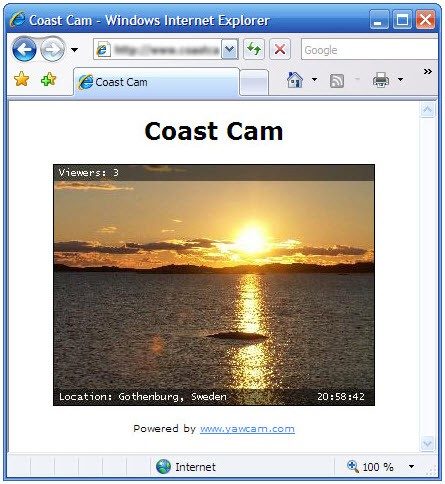
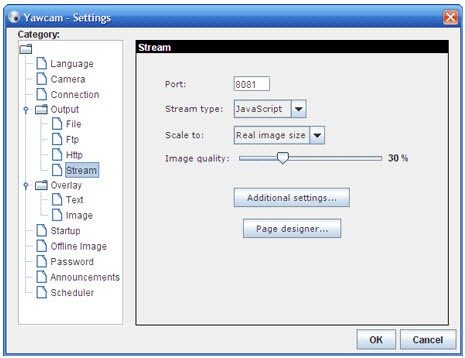
Once installed, Yawcam offers two primary ways to get your video out there. Local streaming and remote access. Both use HTTP. You set a port, and anyone on your network can type that address into a browser. The stream is MJPEG. This is an older format, but it’s widely supported. Every browser can render it without plugins. For most home surveillance needs, MJPEG is sufficient. It’s not 60fps smooth, but it’s real-time.
For remote access, you still use HTTP. You just point your browser to your public IP address and the configured port. This is where security matters. The software includes basic password protection. It also offers IP filtering. You can create a whitelist of addresses allowed to view the stream. It’s not enterprise-grade encryption. But for a backyard camera or a pet monitor, it’s enough.
If you need to archive footage, Yawcam can upload JPEG snapshots to an FTP server. This is a great way to store evidence without buying cloud storage. You set the FTP credentials in the settings. The software handles the connection. It doesn’t record continuous video to the FTP server. Just snapshots. This saves bandwidth and storage space.
Key Features That Save Storage and Bandwidth
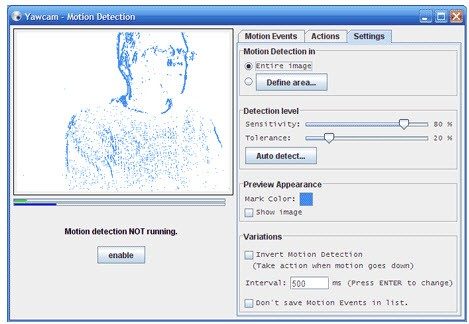
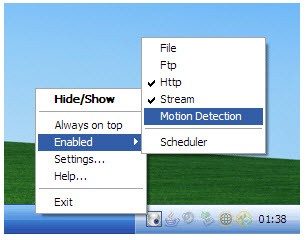
Why stream continuously when you only care about movement? Yawcam includes motion detection. It analyzes frames for changes. When motion is detected, it can trigger actions. You can configure it to take a snapshot. You can set it to upload that image via FTP. You can even schedule these events.
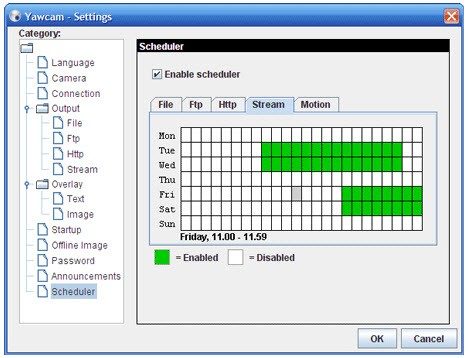
The scheduling feature is straightforward. You can define specific hours when the camera is active. This is useful if you only need to monitor a room during business hours. Or if you want to save battery life on a battery-powered setup. It reduces the load on your system. It also reduces the risk of false
The Silent War for Your Digital Identity
The threat landscape isn’t just about flashy ransomware anymore. It’s about the slow, grinding erosion of trust in our digital infrastructure. You’ve seen the headlines. Data breaches are routine now. But here is what the press releases rarely tell you: the real damage isn’t in the stolen credit card numbers. It’s in the loss of control over who sees your life.
Consider the shift from perimeter-based security to zero-trust architectures. This isn’t a buzzword. It’s a necessity.
“Trust no one. Verify everything.”
This mantra has moved from theoretical cybersecurity frameworks into the daily operations of major cloud providers. Why does this matter to you? Because your password is likely already compromised. The same password you use for your email, your banking app, and that sketchy forum you visited in 2019. Once one link breaks, the whole chain falls.
Multi-Factor Authentication: No Longer Optional
Let’s talk about MFA (Multi-Factor Authentication). If you are still relying on SMS-based two-factor authentication, you are walking around with your front door unlocked. It is not secure. SMS can be intercepted via SIM swapping. It is trivial for a determined attacker to bypass.
The shift is toward app-based authenticators or hardware keys. FIDO2 standards are becoming the norm for a reason. They use public-key cryptography, which is mathematically harder to crack than a one-time code sent via text.
Which method is safest?
- SMS : Least secure. Vulnerable to interception.
- App-based (TOTP) : Better. Codes are generated locally on your device.
- Hardware Keys (YubiKey, etc.) : Most secure. Phishing-resistant. Requires physical possession.
You don’t need a degree in cryptography to understand this. If something can be intercepted remotely, it’s not secure. If it requires physical access, it is significantly harder to compromise.
The Rise of AI-Driven Threats
Artificial intelligence is not just a tool for defense. Attackers are using it too. Automated phishing campaigns now generate personalized emails that mimic your colleagues’ writing styles. Deepfake audio can trick executives into authorizing fraudulent wire transfers.
This is not science fiction. It is happening in enterprise environments right now. The speed at which AI can analyze vast amounts of data allows for highly targeted social engineering attacks. Humans are predictable. AI exploits that predictability.
But there is a countermeasure. AI-driven security tools can detect anomalies in network traffic faster than any human analyst. They spot the weird login time. The unusual data transfer volume. The slight deviation in behavior patterns that signals a compromised account.
Zero Trust: A Framework, Not a Product
You cannot buy a “zero trust” box. It is a strategy. It assumes that breach is inevitable. It segments networks so that even if an attacker gets in, they cannot move laterally to access sensitive data.
For the average user, this translates to better account isolation. Your work email is separated from your personal browsing. Your critical financial apps run in sandboxed environments. This limits the blast radius of a potential compromise.
How does this affect your daily workflow?
It might mean more friction. More logins. More verification steps. But that friction is the point. Security is rarely frictionless. If