If you’ve ever opened your computer’s BIOS settings or changed a cartridge in a retro console, you’ve already worked with ROM. But what exactly is a ROM and why is it so important in your daily technological life?
ROM stands for Read Only Memory. This is a digital equivalent of a stone tablet.
Unlike laptop RAM, which disappears when you turn off the power, ROM retains data indefinitely.
It is non-volatile.
This means that the instructions stored on the chip remain intact even if the power cord is unplugged.
This persistence makes the ROM the backbone of device initialization.
Important firmware and System settings are preserved, allowing the hardware to recognize itself and start up. Without it, computers would be expensive plastic and silicon that we don’t know what to do with.
Key Differences: ROM, RAM, Storage
To understand why your device needs ROM, you need to differentiate it from the other two common types of storage you use every day: RAM and hard drives.
RAM (Random Access Memory) is volatile. This is your workspace. When you open an app, it stays in RAM for speed. However, when you close the lid or disconnect the machine, the RAM is completely cleared. This is temporary.
Hard drives and SSDs are used as mass storage. In it, files can be written, deleted and overwritten millions of times. they are flexible.
ROM is rigid. In many cases, content cannot be rewritten without specialized industrial equipment. It is designed to store content that must not change. If the operating system kernel or BIOS code is stored in RAM, everything will be lost on reboot. If it is stored on a regular hard drive, it will slow down the boot process and be more prone to corruption during boot. ROM is somewhere in between, and is permanent like a hard drive, but accessible at the speed needed to boot the system and directly.
How ROM really work
At a microscopic level, ROM is a network of memory cells. Each cell contains one bit of data (0 or 1).
The magic happens during the manufacturing process. Engineers use techniques such as photolithography to physically etch or fuse transistors into specific patterns. Once these physical connections are made, the data is “hard-wired”. It’s not just about saving files. You aren’t just saving a file; The physical state of the chip is changed to represent binary code.
Computers use two main components when reading data from ROM: word lines and bit lines.
- Addressing: The system selects a row of memory cells by activating a certain row of words.
- Retrieval: Information from these selected cells is transferred to the processor via bit lines for interpretation.
No “search” is required because the data is physically encoded. The signal path is straight. This is why ROM is so reliable for firmware. This is not a guess. Reading fixed circuits.
6 ROM you need to know
Not all ROM are created equal. Over the decades, engineers have developed various variations to balance cost, flexibility, and reprogrammability.
1.Mask ROM
This is the original “hard-wired” ROM. The data is encoded during the chip manufacturing process. Cheapest option for mass production, but zero flexibility. Once the batch is produced, the information is set permanently. This is found in millions of simple electronic devices that require no code changes.
2.PROM (programmable ROM)
PROM starts with a blank slate. Users can write data at once using a special programmer. It is immutable after the first write. It’s like burning a CD-R. It cannot be deleted. It can only be written once.
3. Eprom (Erasable Programmable ROM)
This is a huge improvement. The EPROM chip package has a small quartz window. To erase the data, expose the chip to strong ultraviolet (UV) light for several minutes. UV photons reset the transistors, allowing the chip to be reprogrammed. While this is revolutionary for developers, UV requirements make it impractical for end users.
4. EEPROM (Electrically Erasable PROM)
EEPROM solves the UV problem. Electrical signals can be used to erase and program these chips byte by byte. No windows or UV lamp are needed. This makes it perfect for storing small amounts of data that need to be updated periodically, such as device serial numbers or calibration settings.
5. Flash memory
Flash memory is basically a faster, block-oriented version of EEPROM. This allows data to be erased and rewritten in large chunks instead of one byte at a time. This speeds up processing considerably. Flash memory is the basis for firmware updates installed on modern SSDs, USB drives, and even routers. It bridges the gap between persistent storage and rewritable flexibility.
6. Standard ROM (mask definition)
In the modern environment, especially in game cartridges and embedded systems where data is finalized at the factory, “ROM” refers to the standard masked ROM memory described in point 1.
Where is ROM in technology?
ROM chips may not be on the shelves, but they are everywhere.
- BIOS/UEFI: When you turn on your computer for the first time, the motherboard uses ROM to store the basic input/output system. This firmware initializes the hardware before loading the operating system.
- Game consoles: Classic cartridges like the NES and Game Boy used ROM chips to store game codes. The games are permanently written to the cartridge, so there is no need to save them to the console.
- Smartphones: Mobile phone bootloader and baseband firmware are stored in ROM or flash memory. This ensures that your phone can boot even if the main operating system crashes.
- IoT Devices: From smart thermostats to car engine control units, ROM contains critical code that tells the hardware how to operate.
Why PROM matter today
Even if you don’t buy PROM chips at Best Buy, the concept is still there. The evolution from mask ROM to flash represents the transition from “write once and forget” to “rewritable persistence”.
Currently, most of the “ROM” functions are handled by Flash. It has the non-volatility of traditional ROM and the ability to update firmware wirelessly. When the router receives security updates, the overwriting Flash memory. When a new version of iOS or Android is installed on your smartphone, much of the storage is rewritten to work like a modern ROM.
Although the distinction is blurred, the core principles remain the same. Some data needs to be persistent, fast and independent of the volatile operating systems used during the day.
“The ROM is the anchor. It prevents the device from floating away into silence when the power cuts.”
As technology advances, physical ROM chips will disappear from consumer devices and be replaced by solid-state alternatives. But the ROM’s job is to make sure the device knows who it is and how to.
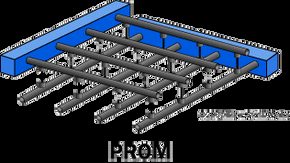

PROM chips look simple at first glance. Like regular read-only memory (ROM), it has a grid of columns and rows. The difference is at the intersection. Each junction has a small fuse.
This design allows users to write data to the chip after it has left the factory. This requires special programming equipment, but results in a custom memory chip that is tailored to your device.
PROM chip programming
The appeal (and limitation) of PROMs lies in their fusible links. If the chip is empty, these links remain. These represent the default state and are typically strings of 1.
Programming involves applying electrical pulses to specific points on the chip. These pulses can blow the fuse. If the fuse blows, the cell’s state changes to 0. Once the fuse blows, it’s gone forever. The data is fixed. It cannot be rewritten.
Prom pros and cons
Empty PROMs are inexpensive. Therefore, it is ideal for prototyping. ROM data can be tested before performing expensive mask-programmed ROM fabrication processes.
However, they are fragile. Static electricity is your enemy. An impact can cause the fuse to blow accidentally. That jolt changes critical bits from 1 to 0, corrupting the data. This is a gamble that doesn’t pay off in a production environment.
How EPROM works
EPROM solves the persistence problem. This allows for selective erasure and reprogramming. The core component here is the floating gate transistor.
These transistors can capture or release electrons. This trapped charge represents binary data. Is it charged? It’s 0. Discharged? That’s a 1.
EPROM chip programming
Programming requires high voltage. This voltage injects electrons into the floating gate. It changes the conductivity of the transistor and locks the data in place.
Erasure is the hard part. Electricity alone cannot zap it. The chip should be exposed to ultraviolet (UV) light. The UV light erases the charge from the floating gate. It resets the cells to its default state.
After erasing, new data can be programmed using the same high voltage process. It’s not immediate. It takes a few minutes under a UV lamp. But it works.
EPROM Suitability
If EPROM is so clunky, why use it? Because it can be updated. This makes it ideal for storing firmware and BIOS in electronic devices. You can fix bugs or add features after building the device. All you need is a UV lamp and a window in the chip package.
How EEPROM and flash memory work
EEPROM and flash memory share the same basic principle: floating-gate transistors. These provide non-volatile storage. Data stays put when power is cut.
This makes it suitable for frequent updates. All system settings, firmware and user data are located here. They replaced the clunky EPROM in most applications.
EEPROM chip programming
EEPROM erases data electronically. No UV light is needed. The high voltage signal removes the stored charge from the floating gate.
This can be done selectively. You can erase one byte at a time. This allows multiple write and erase cycles. It is flexible. Faster than EPROM. And no special lamps are needed.
Flash programming
Flash memory works in the same way, but on a larger scale. Organize cells into blocks and sectors. This structure is the key.
The tunneling mechanism is used to move electrons in and out of the floating gates. Programming captures electrons. Erasure pulls them out.
Flash memory performs block erasure. You can’t erase a single byte. The entire block must be deleted. This makes it inefficient for small changes, but very efficient for mass data storage. This is the backbone of modern USB drives, SSDs and SD cards.
We used a combination of artificial intelligence technology to create this article, which was reviewed and edited by HowStuffWorks editors.
Frequently asked questions
Is ROM a Scrabble word?
Yes, ROM is in the scrabble dictionary.
What is ROM and examples?
ROM is an acronym for Read-Only Memory. This refers to a computer memory chip that contains fixed instructions that cannot be changed. It is non-volatile, meaning it retains its contents even if the power goes out. An example of ROM is a cartridge used in video game consoles.