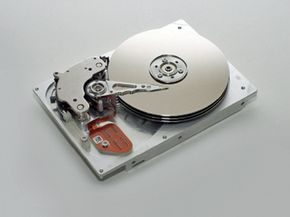
Hard drives die. It is not a question of if, but when. If you are storing irreplaceable data on a mechanical drive, failure is not just an inconvenience. It is a potential catastrophe. You might be staring at a drive that won’t spin up, wondering if the family photos, work documents, or financial records you meant to back up but never did are gone forever.
There is often hope. Do not toss the broken drive in the trash yet.
We need to look at the warning signs of impending failure, understand the internal mechanics that cause these breaks, and walk through the steps you can take to recover data. The files can’t always be saved. But there is a chance.
One thing to keep in mind, though. Even if you get your data back, it will likely take hours of frustrating effort. It might also cost you a significant amount of money in professional recovery services. The most effective way to handle a dead hard drive is usually simpler: send it in under warranty, replace it, and restore from a backup. A solid backup plan prevents that hollow feeling in your stomach when you realize your data is at risk.
Recognizing the early warning signs
Hard drives rarely die without a struggle. They usually send signals first. Listen to your computer. If you hear clicking, grinding, or whirring noises that weren’t there before, stop using the drive immediately. These sounds often indicate physical damage to the read/write heads or the platters inside.
Another sign is slow performance. If files take an unusually long time to open or copy, the drive might be struggling to read sectors. You might also see error messages when trying to access specific files. The operating system might report that the drive is not recognized, or it may appear and then disappear from your file explorer.
These are not issues to ignore. Ignoring them usually leads to total data loss.
The mechanics of failure
To understand why data gets lost, you need to know what is inside the drive. A traditional hard drive contains platters coated with magnetic material. A read/write head floats nanometers above these platters as they spin at high speeds. Dust, heat, or a physical shock can cause the head to crash into the platter. This damage is often permanent.
Electronic components can also fail. The circuit board that controls the drive can short out due to power surges or age. Firmware corruption is another common issue. This software manages the drive’s operations, and if it gets corrupted, the drive may become inaccessible even if the physical platters are intact.
Steps to attempt data recovery
If you suspect your drive is failing, act fast. The longer you use a failing drive, the higher the risk of permanent data loss.
- Stop using the drive immediately. Every time you power it on or attempt to read from it, you risk further damage. If the drive is making noises, shut down your computer.
- Assess the value of the data. If the data is critical and you have no backup, consider professional recovery services. They have clean rooms and specialized tools to handle physical damage. This is expensive.
- Try software recovery only if the drive is still accessible. If the drive is recognized but files are missing or corrupted, you can use data recovery software. Copy the data to a